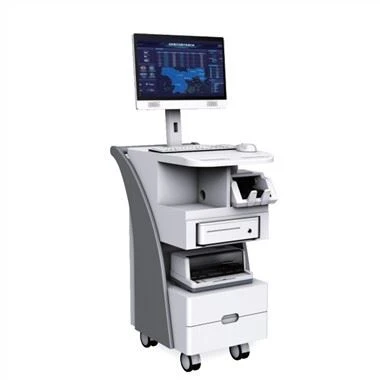
How to solve the touch problem of the all-in-one touch machine? After we buy the all-in-one touch machine and use it for a period of time, there will be some problems that are inevitable, some are out of warranty or the problem is not big or small, then how to solve the minor problems? The touch all-in-one machine is not sensitive to touch Or some places can not be touched? Let's take a look at the following solutions.
Dotaknite se vse-v-enem
1. Check that the cable is a USB interface. First, unplug the USB cable that is in contact with the all-in-one machine, and see if there is any text. Check if there is a problem with the USB cable. There is no problem with the USB cable. See if there is a problem with the host's USB interface. , Now we can plug in the USB mouse or keyboard cable. "When there is a problem with the USB port or USB data line, check whether there is a conflict between the serial port and the interrupt number. If there is a conflict, adjust to avoid resource conflicts. After checking that the touch screen is not connected, if it is connected to a connection of the host keyboard On the port (5V is obtained from the touch screen keyboard port), check the connection. If the structure is mobile, the parts that should be reconnected are not good, not whether the cable is broken.
2. Sama tehnologija zaslona predvideva, da se dotik vse{1}}vse v-uporablja že dolgo (3-4 leta), preko zaslona na dotik pa je mogoče ugotoviti, da nekatera raziskovalna področja nedotakljivo. Morda je zaslon na dotik pokvarjen. Prosimo, zamenjajte zaslon na dotik.
3. Pravilen zaslon na dotik. Dotaknite se infrardečega zaslona na dotik, da popravite. Postopek popravljanja infrardečega zaslona na dotik je običajno: prikažite nekaj oznak na več različnih položajih na zaslonu zaporedoma, kliknite te oznake s pisalom na dotik ali prstom, na infrardečem zaslonu se bodo pojavile štiri točke zaporedoma, pritisnite levo, desno, levo, desno, desno, desno, pritisnite za dokončanje popravka.
4. Najprej preverite programsko opremo in se prepričajte, da je gonilnik za zaslon na dotik nameščen na gostiteljskem računalniku. Če se potrdi, da gonilnik zaslona na dotik ne izpolnjuje zgornjih zahtev, izbrišite gonilnik zaslona na dotik in nato znova zaženite računalnik, da znova namestite gonilnik. Kliknite tukaj za nove gonilnike za vsak sistem.
Če se zgornje metode ne odzovejo, glede na to, da programska oprema deluje prehitro, primanjkuje prostora za shranjevanje v računalniku z zaslonom na dotik vse{0}}vse v-enem računalniku in odziv je počasen. Zato je kratkoročna-rešitev zagon in ponovni zagon, dolgoročna-rešitev pa je povečanje pomnilnika.
The above are some solutions that the editor summarized for you on how to solve the problem of touch all-in-one touch. I hope to help you. If it still can't be solved, it's best to call the merchant's after-sales phone, describe the problem clearly, and then professional after-sales solve you. The problem.